Skip to content
Book a demo

RIVERRISE BOOKINGS 1.8: booking on the page and an availability calendar

What changed

  • NewBooking on the page. Put the whole booking window inside a page instead of a pop-up, so a “Book” page shows trips, dates and checkout right where guests land. It fits the width of your page and works the same on phones.
  • NewAvailability calendar. Show a month of open dates anywhere on your site, with a small dot on days that only have a few seats left. Guests tap a date and booking opens on that date.
  • NewStart on a trip. Point any booking button, page or calendar at one trip, so each trip’s own page books that trip.
  • ImprovedSame choices everywhere. The RIVERRISE BOOKINGS block and Elementor widget offer the booking section, a button, booking on the page or the availability calendar, plus which trip to start on.
  • ImprovedCopy and paste. Settings, Booking window lists every way to add booking to your site, with copy buttons and your trip IDs.

What stays the same

  • ImprovedYour current buttons and links. Existing booking sections, buttons and #book links keep working exactly as before. The new options are there when you want them.
RIVERRISE BOOKINGS 1.7: a new booking window and season prices

What changed

  • NewA booking window built around the trip. Guests start with photo cards for each trip, with the price, the length and tags like “Guide’s pick”. Then they pick a date on a full month calendar, a start time and their group size, and finish on a short checkout.
  • NewSeason prices. Give any trip its own price in each season, like a private boat at one price early in the season and another in summer. Guests see “From” pricing until they pick a date, then the exact price. Staff bookings and trip changes use the season price too.
  • ImprovedMade for every screen. On a computer the window opens over your site with the calendar beside the start times. On tablets and phones it fills the screen with large dates and buttons that are easy to tap.
  • ImprovedA shorter checkout. Name, email and phone, one switch between paying the deposit or paying in full, and the exact date and amount of the balance charge.
  • NewTrip photos, short lines and tags. Each trip can have its own photo and tagline. Trips that only run part of the year show their dates.
  • ImprovedA cleaner admin. One top bar for Dashboard, Calendar, Bookings, Gift cards, Reports and Settings. Settings has a grouped menu, trips and seasons are short lists you open to edit, and a save bar shows up as soon as something changes.
  • ImprovedA clearer calendar. Each day shows every start time with a bar for how full it is. Full trips are solid green and closed ones are outlined in red.

What stays the same

  • ImprovedYour bookings and settings. Trips, seasons, prices, colors and bookings carry over. Update under Plugins and everything keeps running. Season prices are optional: trips keep their standard price until you set one.

RIVERRISE BOOKINGS 1.6: a new home at riverrisebookings.com

What changed

  • Newriverrisebookings.com. License check-ins and plugin updates now come from riverrisebookings.com, and the “Powered by” credit links here.
  • ImprovedOne name everywhere. The booking window, guest pages, emails, staff app and admin all say RIVERRISE BOOKINGS.
  • NewNew contact addresses. Reach us at Sales@RIVERRISEBookings.com and Support@RIVERRISEBookings.com.

What stays the same

  • ImprovedYour bookings and settings. Nothing to move or redo. Update under Plugins and everything keeps running.

RIVERRISE BOOKINGS 1.5: a faster, cleaner booking window

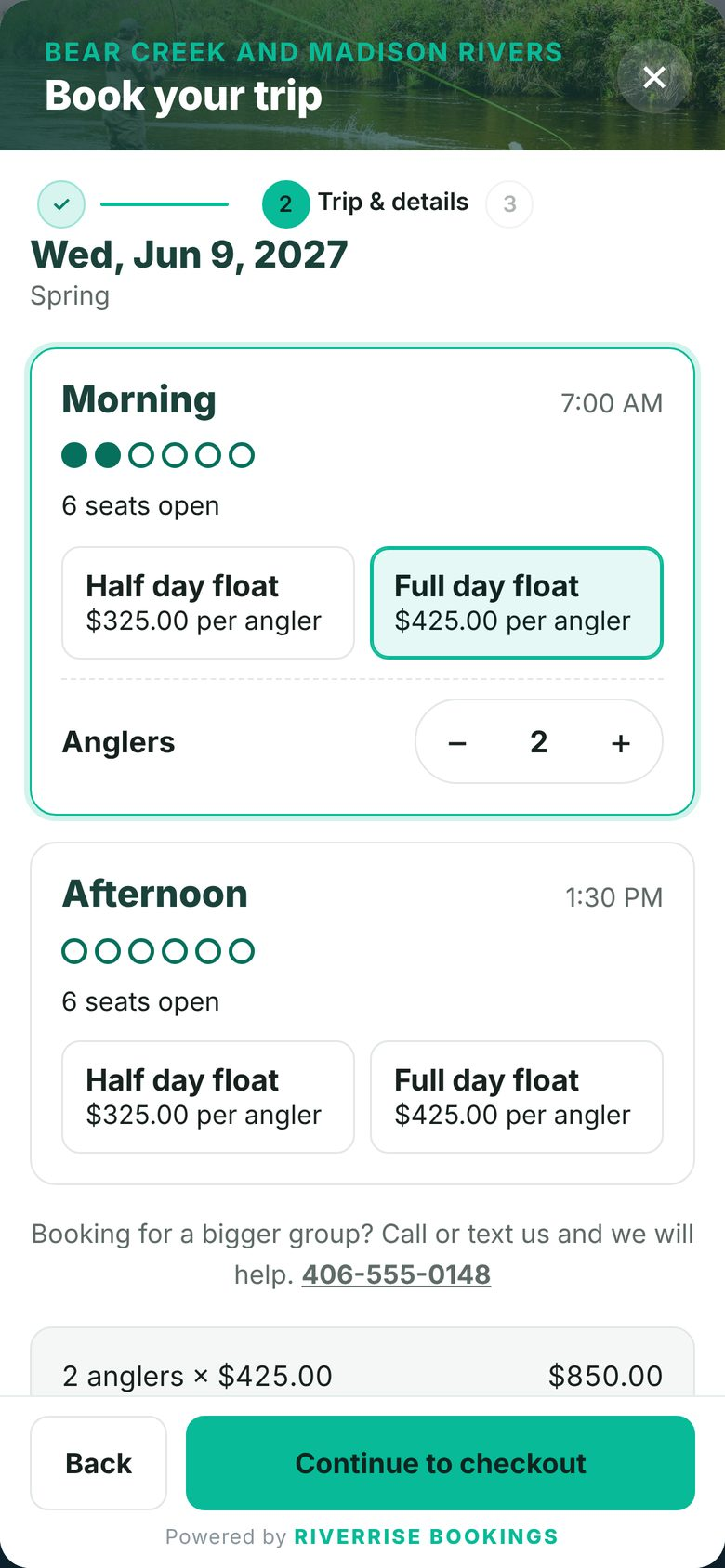
Choosing a trip and group in the booking window
Pick a trip and group. The price updates as they go.
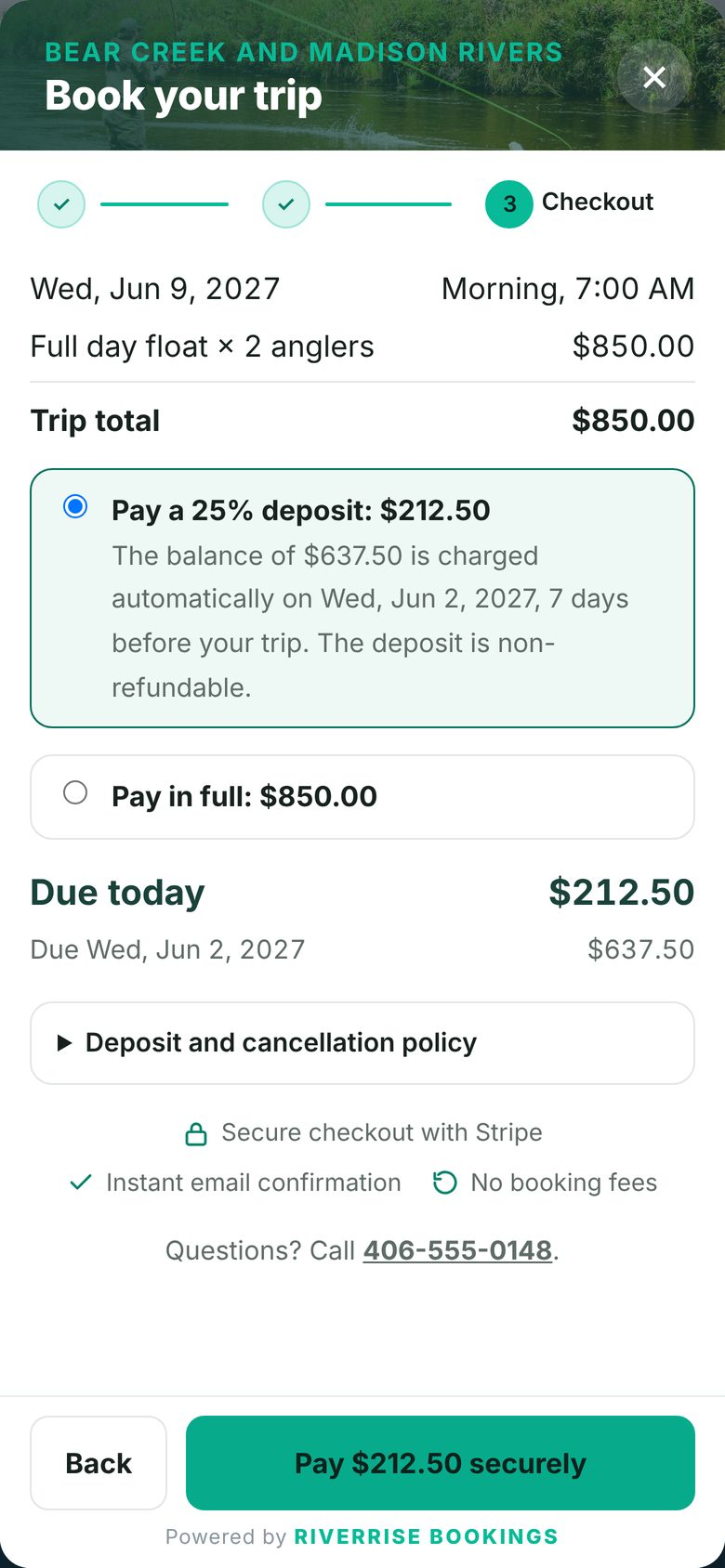
Checkout showing the deposit due today and the balance date
Checkout shows what's due today and when the rest is charged.

The booking window

  • NewA three-step booking. A simple progress bar, Date, Trip and details, Checkout, with cleaner cards and spacing. Your colors, fonts, logo and header photo are kept.
  • NewA softer calendar. Open days are lightly shaded in your brand color, nearly full days get a small dot and booked days are greyed out. Season names stay on the days each season starts.
  • ImprovedFewer steps. Review and payment are now one Checkout step, and the window opens on the first month that still has open dates.
  • NewPrices up front. Once a trip is picked, a price box shows the trip total and what's due today, and the pay button names the amount, like “Pay $212.50 securely”.
  • ImprovedLess to fill in. “How did you hear about us?” is optional, and the promo and gift card field sits behind a link.
  • NewConfidence at checkout. Secure checkout, instant confirmation and your deposit terms show before payment. Trips with three seats or fewer left say so, and the next 7 days show small weather icons.

Fixes

  • FixedReports. The money table no longer runs past the edge of its card, and report cards sit side by side on wide screens.
  • FixedImported bookings. A booking imported with no trip total now shows “Check balance” instead of “Paid in full”.

RIVERRISE BOOKINGS 1.4: weather you can read at a glance

Weather graphics

  • NewForecast pictures. Each launch spot shows sun, clouds, rain, storms, fog, wind or snow, the temperature in large type, a wind arrow pointing the way it blows, the chance of rain and tonight's low.
  • NewEverywhere you look. The phone app's day view shows the same pictures, and the dashboard's Next 7 days shows a small weather icon under each day, with a red dot on flagged days.

The office

  • ImprovedRIVERRISE colors. Pine, forest green and teal on white. Amber marks things to check and red marks errors and declined cards.
  • ImprovedCalendar. Days with bookings are shaded light green.
  • ImprovedSetup checklist. It now lives under Settings and goes away once every step is done. Until then, the dashboard shows a short “Finish setting up” card.
  • ImprovedA tidier WordPress menu. RR BOOKINGS shows quick links only, and everything else is in the booking sidebar.

RIVERRISE BOOKINGS 1.3: a new dashboard, synced calendars, marine forecasts and charter extras

A dashboard built for the season

  • NewDashboard home. Bookings, net revenue, fill rate and fees saved at a glance, a bookings chart, the next 7 days, today's trips with seats filled, and a Needs attention list for declined cards, unsigned waivers, missing meeting details, weather holds and the waitlist.
  • NewOrganized around your day. A sidebar grouped into Run the day, Sell, Grow and Set up, with search and an Add a booking button on every screen.
  • NewFees saved. The dashboard and the phone app show what booking direct saved you this season, compared with a marketplace commission you set.

No more double bookings

  • NewOutside calendars. Paste the calendar link from FishingBooker, Guidesly or any marketplace or calendar, and the seats those bookings use are held automatically, checked every 15 minutes.

Know where bookings come from

  • NewBooking sources. Each booking remembers the ad, search, social post or email link the guest arrived through, with a report by source and campaign.

Weather for your launch spots

  • NewMarine forecast. The day view shows the National Weather Service forecast for each launch spot and flags small craft, wind, gale, storm, flood and fog alerts. The office gets an email and staff get an alert when a flagged day has trips.

Charter extras

  • NewTips for the crew. Guests can tip from the review email.
  • NewSplit payments. Each angler can pay their own share.
  • NewCatch photos. Snap and send catch photos from the phone app.
  • NewFishing license button. A button in emails sends guests to get their license.
  • NewWaitlist. Guests can join a waitlist for full dates.
  • NewSame week next year. A yearly email invites last season's guests back for the same week.

RIVERRISE BOOKINGS 1.2: cancellation emails and a sharper phone app

Bookings

  • NewCancellation emails. Cancelling a booking can email the guest, including how much was refunded, with a button to book another date.

Staff phone app

  • NewYour icon on the home screen. Your logo becomes the app icon, or use a finished square icon. “Add to Home Screen” names the app after your business.
  • ImprovediPhone polish. Larger tab bar icons and labels, a tab bar that keeps clear of the home indicator and a header that reads clearly under the status bar.
  • ImprovedTurning on alerts. “Turn on alerts” shows its progress, recovers on its own if it gets stuck and says what went wrong if it fails.

RIVERRISE BOOKINGS 1.1: the staff phone app, your own email and an import tool

The staff phone app

  • NewYour day in your pocket. Today's and upcoming trips, guest details with one-tap call and text, meeting details and notes. Add it to your home screen, with no app store needed.
  • NewPhone alerts. New bookings, cancellations, trips missing meeting details, trips assigned to a guide and, for owners, declined cards and unfinished checkouts.
  • NewBook from the dock. Owners can add a booking and text the guest a payment link, and see money at a glance. Guides never see money.
  • NewWeak signal. The app keeps the last copy of each screen, so today's trips still show on the water.

Email from your own address

  • NewEmail sending. Booking emails can send through your own Google Workspace, Microsoft 365, GoDaddy, Zoho or SMTP account.
  • NewTest button with plain-language fixes. Send a test, and if it fails you see what went wrong and how to fix it. Your password is stored encrypted.

Moving over from another system

  • NewImport tool. Bring over upcoming bookings, past guests, open gift cards and blocked dates from FareHarbor, FishingBooker, TripWorks, Peek, Xola, Checkfront or a spreadsheet. Every import can be undone.
  • NewReturning guests. Booking pages show a guest's past trips, and Reports has a guest list export.

Smaller touches

  • ImprovedWaiver page. After signing, guests see “You're all set”, or who in the group still needs to sign with a link to send them.
  • ImprovedNew default fonts. Emails, guest pages and the staff app use Archivo Narrow and Archivo unless you've set your own.

RIVERRISE BOOKINGS 1.0: the full booking system, now a WordPress plugin

Booking on your own website

  • NewBooking window. Guests pick a date, a trip and their group, then pay, right on your site.
  • NewLive availability by boat. Open seats are counted per boat and start time, and a private trip takes a whole empty boat.
  • NewDeposits and automatic balances. The deposit holds the seats, the card is saved with Stripe, and the balance is charged automatically before the trip.
  • NewPhone bookings. Book a caller from the office and send them a payment link that holds their seats.

Before and after the trip

  • NewOnline waivers. Every guest signs from their own phone.
  • NewReminders and review requests. Meeting details go out before the trip, and a review request goes out the day after.
  • NewReturning-guest codes. Past guests get a code for their next trip.
  • NewWeather cancellations in one step. Every guest gets an email to pick a new date or take a refund, and balance charges pause until they choose.

Gift cards

  • NewSold on your site. Paid through Stripe, emailed right away with a printable card, and redeemed at checkout.
  • NewManaged in one place. Issue, adjust, resend and void gift cards from their own page.

Your brand, your words

  • NewRename “boat”. Call it a raft, a guide or a group, and the booking window and day sheets use your word.
  • NewBranded emails and guest pages. Your photo and business name up top, a clean trip details card, full-width buttons on phones and a proper dark mode in Apple Mail and Outlook.
  • NewReadable on any brand color. Buttons pick dark or white text automatically, so they stay readable.

The office

  • NewOwner and guide logins. Guides see their trips. Owners see everything.
  • NewReports and CSV exports. Bookings and money, ready for your bookkeeper.
  • NewOne-click updates. New versions show up under Plugins for sites with an active license.